
Before You Delete Your Account
Deleting your account is a permanent action. Once completed, your bills, customers, inventory and all related data stored in the app will be removed and cannot be recovered.
All Data Removed
Your account, billing records, and app data associated with your profile are deleted from the application database.
No Future Access
You won’t be able to log in with this account again. To use Asli Bill later, you’ll need to register a new account.
Export Before Deleting
If needed, export or save important reports or invoices before you proceed with deletion.
How to Delete Your Account in the App
-
1
Open the Application Sidebar
Log in to the Asli Bill app and tap the menu / sidebar icon on the home screen to open the main navigation.
-
2
Tap on Delete Account
In the sidebar, scroll to the Account / Settings area and tap on the Delete Account option to start the deletion process.
-
3
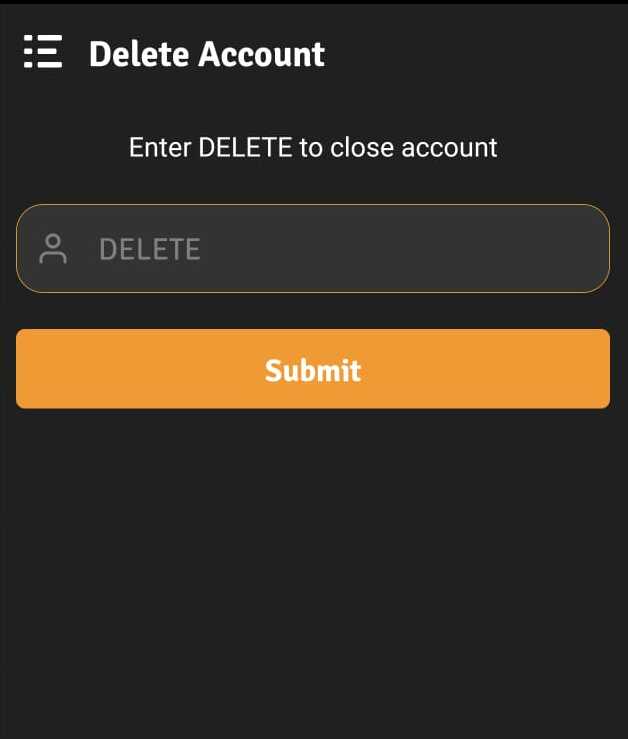
Confirm by Typing
DELETEWhen asked for confirmation, type
DELETEin the input box and submit.After confirmation, your account and its data will be automatically deleted and you’ll be redirected to the login page.
Important: This process is irreversible. Once your account is deleted, Asli Bill cannot restore your data. If you only want to stop using the app temporarily, consider simply logging out instead.
Account Deletion – Quick FAQs
Not sure? Talk to us on WhatsApp before you delete anything.
Contact SupportCan I recover my account after deleting it?
No. Once deleted, your Asli Bill account and its data cannot be recovered.
Will my previous bills and reports also be deleted?
Yes, bills, customers, inventory and other account-linked data stored in the app will be removed as part of the deletion.
I made a mistake, what should I do?
If you haven’t confirmed yet, you can cancel the process. If you’ve already typed DELETE and submitted, you’ll need to create a new account or contact support for further guidance.